
Superfan: College Football
Superfan SportsSports
4.81.02K Reviews
- Version
- 13.5.2
- Installs
- 500.00K
- Age Rating
- Teen
Screenshots

Our Review of Superfan: College Football
 Analysis by Appyee
When I follow college football on a busy day, the hardest part is not finding a score. It is keeping up with the story behind the score: the sequence of plays, the changing rankings, the schedule ahead, and the player news that can alter expectations before kickoff. Superfan: College Football, from Superfan Sports, is built around that need. After spending time with this sports app, I found its most useful capability is the way it brings live game information and surrounding context into one place instead of making me jump between a score app, a rankings page, and a news feed.
That focus makes it more practical than its short name might suggest. It is free to install, aimed at teen users, and has reached more than 500,000 installs. Its average rating sits at 4.8 from around 9,400 ratings, which matches my impression that it serves a very specific audience well: people who want college football details close at hand, but do not necessarily want a full sports media platform taking over their phone.
Why the live game view is the app’s real strength
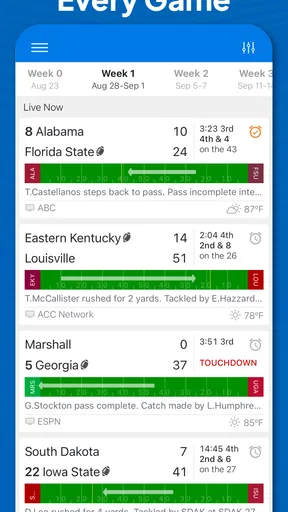
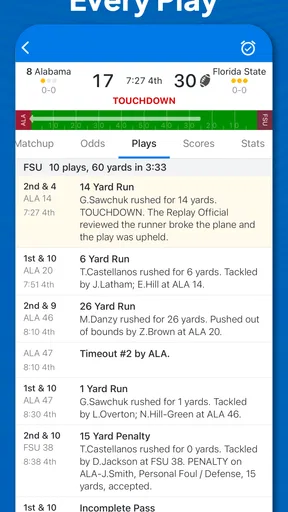
The central experience is live college football coverage. Scores are the starting point, but the play-by-play view is what gives the app its identity. A score tells me who is ahead; a running account of the game helps me understand how that lead developed. That difference matters when I arrive late, check a game during a break, or want to know whether a close result came from steady control or a sudden swing.
I particularly like this approach for games I cannot watch continuously. A television broadcast gives emotion and analysis, while a basic scoreboard gives speed. Superfan: College Football sits between those options. Its live updates let me reconstruct the important moments without requiring me to keep video open. For a fan checking a phone at work, in transit, or between errands, that is a sensible use of a small screen.
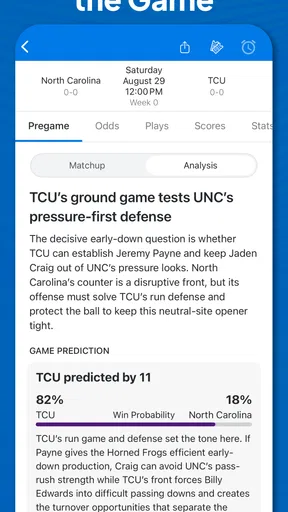
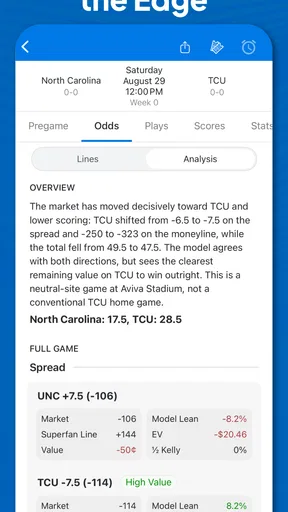
The surrounding information is also important. The app brings together scores, statistics, schedules, College Football Playoff rankings, and injury information. These are not separate extras in the way I use them. They answer different questions about the same sport. The score tells me what is happening now, the schedule tells me what comes next, rankings provide national context, and injuries help explain why a matchup may look different from an earlier meeting.
The best reason to use this app is not simply speed; it is the connection between a live result and the context needed to interpret it. That makes it more valuable than a notification-only tool, especially for users who follow several teams or try to keep an eye on the wider national picture.
Turning a quick check into a useful routine
My preferred way to use it is in three short passes. First, I check the live score to see whether anything important has changed. Next, I look at the play-by-play rather than relying on the score alone. Finally, I use the statistics, rankings, or injury information to decide whether the result is meaningful beyond that single moment. This routine takes less effort than opening several unrelated sports services, and it reduces the chance that I misunderstand a game because I only saw the latest number.
That workflow is especially useful during a crowded Saturday. Several games can be underway at once, and it is easy to lose track of which result affects a team’s position or upcoming expectations. Instead of treating every game as an isolated alert, I can use the schedule to plan what to follow, the live view to monitor it, and the rankings to judge the broader effect afterward.
A less obvious benefit is that the app can help me decide when a game deserves deeper attention. If the score is close and the play-by-play shows repeated momentum changes, I know it is worth staying with. If one team has built a comfortable advantage and the statistical picture supports that lead, I can check back later without feeling that I missed the entire story. The app therefore works as a filter for attention, not just a place to read results.
What the information feels like in practice
Play-by-play is most helpful when I already know the basic rules and vocabulary of college football. It is not a substitute for learning the sport, and a new viewer may still need explanations that a dedicated beginner guide would provide. For an established fan, though, the compact format is efficient. I can scan the latest sequence, identify the turning point, and decide whether I want to follow the rest of the game more closely.
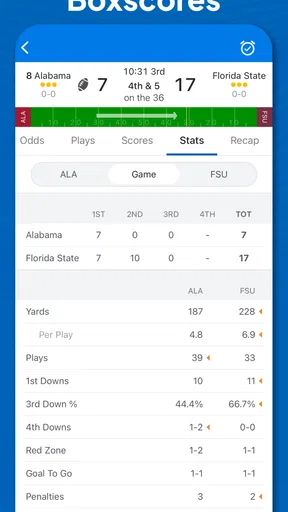
Statistics add another layer, but I would not treat them as a complete scouting report. Their practical value is comparison. Looking at the numbers alongside the score can show whether a team is controlling possession, producing consistent offense, or surviving on a few decisive plays. That helps me avoid overreacting to a single highlight or a temporary lead.
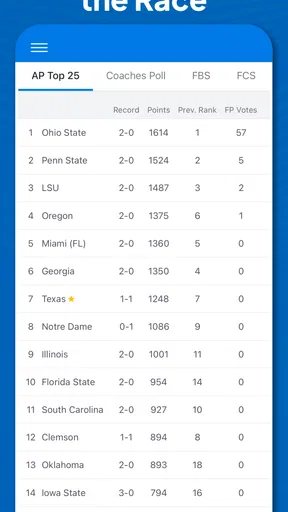
The rankings are useful in a different way. They give a national frame to games that might otherwise seem important only to supporters of the teams involved. I can check how a result fits into the playoff conversation and use that information when planning which games to watch next. The rankings are not a prediction engine, and I would not use them as the sole reason to judge a team, but they make the app more useful during the part of the season when every result is discussed in relation to the larger picture.
Injury information is another feature I would check before making assumptions about a matchup. It can explain a surprising lineup or a change in expectations, although I still prefer to treat it as context rather than certainty. A player’s status can change, and no compact sports app should replace official team news when the detail matters to a personal decision.
A realistic Saturday use case
Imagine I am away from home on a Saturday afternoon and cannot watch a full game. I open the app to check one team, notice that another important matchup is close, and use the schedule to see what is coming later. The live score gives me the immediate situation, while the play-by-play tells me whether the game is genuinely tense or merely close on the scoreboard. I then glance at the statistics and rankings before deciding which game deserves my limited attention.
Later, if I hear that a highly regarded team lost, I can review the game rather than relying on a headline or a friend’s summary. The sequence of plays helps me understand whether the upset came from an early deficit, a late collapse, or a consistently strong performance by the underdog. That is the kind of everyday usefulness I found more convincing than simply seeing a long list of available sections.
This scenario also shows why the app is better for active followers than for occasional sports browsers. If I only care about the final score of one major game, a search engine or a general news app may be quicker. If I want to follow the day as it develops, Superfan Sports’ focused presentation makes more sense.
Where it differs from the usual alternatives
A general sports app usually covers many leagues and sports, which is convenient when my interests are broad. The trade-off is that college football can become one tile among dozens. Superfan: College Football feels more focused because its purpose is narrower. That focus reduces the time I spend filtering out unrelated content, and it gives the schedule, rankings, injuries, and live game details a more coherent relationship.
A team-specific app may be better when I want every update about one school, particularly if I care about team news beyond games. This app is more suitable when I follow the sport across conferences and want to compare several teams. I would choose the team-specific option for deep loyalty to one program, but I would choose Superfan for a broader college football weekend.
Live television and streaming remain better for atmosphere, commentary, and seeing the action. This app cannot recreate the experience of watching a game unfold visually, and I would not expect it to. Its advantage is flexibility: I can use it when video is impractical, when I need a quick update, or when I want a reference beside a broadcast. In that role, it complements video rather than replacing it.
Search and social media can also be faster for a single breaking detail, but they are less dependable as a structured way to follow a full slate of games. A social feed may show the loudest reaction rather than the most useful context. Here, the combination of schedule, live updates, and supporting information gives me a calmer way to follow events.
The trade-offs I noticed
The focused design is also its main limitation. If I want coverage of professional sports, other college sports, or a broad news feed, I need another service. This is not an all-purpose sports hub, and trying to make it one would probably weaken the reason to use it in the first place.
The amount of information can also feel dense during a busy game day. Scores, statistics, rankings, injuries, and schedules are all useful, but a first-time user may need a little time to establish a personal routine. I found it easier to begin with one team and one live game, then expand into the other sections rather than trying to absorb everything at once.
There is also a judgment issue with rankings and injuries. They are valuable context, but they can encourage fans to form a quick conclusion before watching the game. I get better results when I use them as prompts for questions: What changed? Which matchup matters? Does the play-by-play support the first impression? The app provides information efficiently, but it is still up to me to interpret it carefully.
The app is free, which removes the biggest barrier to trying it. It does include in-app purchases ranging from $1.99 to $12.99 per item, so I would review any purchase prompt before confirming it. I appreciate being able to start without paying, but users who prefer a completely purchase-free experience should pay attention to how optional extras are presented.
Because the content rating is Teen, I would see it as a general fan app for older children, teenagers, and adults rather than something designed specifically for young children. That fits the subject matter and the amount of sports information involved. Parents choosing it for a younger user should still consider whether the child is ready to interpret live sports updates independently.
Small habits that make it more useful
One habit I recommend is checking the schedule before the games begin. That sounds obvious, but it changes the app from a reactive scoreboard into a planning tool. I can mark mentally which games matter to the teams I follow, which ones affect the playoff picture, and which matchups might be worth checking if time allows.
A second habit is to read a few play-by-play entries before looking at the statistics. Numbers are easier to understand when I know what kind of game produced them. A team may have a statistical edge but still be vulnerable late, while another may be behind in broad totals and yet have created the most important scoring opportunities. The sequence gives the figures meaning.
A third is to revisit injuries when a result seems surprising. Instead of treating an upset as random, I can check whether the available injury context offers a reasonable explanation. This does not prove causation, but it helps me ask a more informed question and avoid repeating an oversimplified reaction.
Finally, I use the rankings after the result rather than before it whenever possible. That keeps the game itself in focus. Rankings can shape expectations, but the live information shows how the teams actually performed. This order of checking makes the app feel less like a source of predetermined opinions and more like a tool for following the season as it unfolds.
Who gets the most from it
The strongest audience is the college football fan who follows more than one team, checks games throughout the day, and wants more than a final score. It is also a good fit for someone who watches some games but cannot commit to every broadcast. The app’s blend of live play-by-play, statistics, schedules, rankings, and injury context gives that user a practical way to stay involved without being tied to a television.
It is less suitable for someone who wants a broad, one-stop sports service, a video-first experience, or detailed coverage of only one school. In those cases, a general sports platform, streaming service, or team-focused source may be a better match. I would also skip it if I only need an occasional score and do not care about the surrounding college football picture.
The app has been available since September 25, 2015, and the current version is 13.5.2. It supports devices running iOS or Android version 9 or later, making compatibility worth checking before installation. Those details matter less than the actual workflow, but they help explain who can use it without needing a newer phone or operating system.
After using it as a companion for live college football, I see Superfan: College Football as a focused utility rather than a replacement for every sports service. Its strongest quality is the way it connects the immediate game to the information around it. I can check what happened, understand the sequence, see why the result matters, and decide what deserves my attention next.
That makes it an easy recommendation for fans who want a dependable college football dashboard in their pocket. I would not recommend it as the only sports app for someone with wide-ranging interests, but for following college football across a crowded weekend, it earns its place. The free starting point, strong user response, and focused design make it worth trying, especially if the usual alternative is constantly switching between unrelated apps just to understand one game.
Verdict
Strengths of Superfan: College Football
- Live scores and updates help fans follow games in real time.
- Team-focused content makes it easy to track favorite college programs.
- Fan discussions create a lively community around major matchups.
- Useful for checking schedules, rankings, and upcoming games quickly.
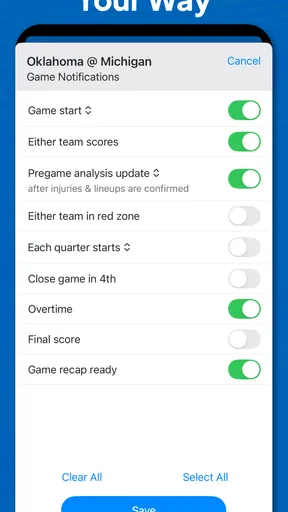
- Personalized alerts can keep you informed without constant app checking.
Limitations of Superfan: College Football
- Coverage and features may vary between schools and conferences.
- Frequent notifications can become distracting during busy game days.
- Some content may be limited outside the main college football season.
- Community posts may include spoilers before you watch a recorded game.
- A stable internet connection is needed for live updates and media content.
Similar Picks in This Category
View All
BeSoccer: Soccer Live Score
BeSoccer apps4.3

Cricbuzz - Live Cricket Scores
Cricbuzz.com3.7

NFL
NFL Enterprises LLC2.4

Da Fit
MO YOUNG LIMITED3.6

ESPN
Disney4.5

LiveScore: Live Sports Scores
LiveScore Limited4.5
Frequently Asked Questions
What is Superfan: College Football?
Superfan: College Football is a mobile game centered on the excitement of college football. It combines team-building, match strategy, progression, and fan-focused features in a format designed for short play sessions. Players can develop their program, make important decisions, compete against other users or game-controlled opponents, and work toward creating a stronger, more successful college football team over time.
Is Superfan: College Football free to download and play?
The game is generally available as a free download, allowing users to begin playing without paying an upfront purchase price. However, free-to-play games commonly include optional in-app purchases, such as premium currency, upgrades, special items, or time-saving features. You can usually progress without spending money, but advancing faster or accessing certain conveniences may require purchases, so parental controls are recommended for younger players.
Does Superfan: College Football require an internet connection?
An internet connection is recommended, and some features may require you to be online. Online access can be necessary for loading account data, participating in competitive events, receiving updates, viewing rankings, or using social and multiplayer functions. If you are traveling or have limited data, check which parts of the game remain available offline, because functionality may be reduced without a stable connection.
Is Superfan: College Football suitable for new players?
The game is approachable for newcomers, especially if you enjoy college football but have limited experience with mobile sports-management games. Early activities generally introduce the main systems gradually, although there can still be several menus, currencies, upgrades, and strategic choices to understand. New players should follow the tutorials carefully, avoid spending premium resources immediately, and focus first on learning the team-building fundamentals.
Does Superfan: College Football use real college teams or players?
Before downloading, users should understand how the game presents college football content and whether specific teams, athletes, names, logos, or likenesses are officially licensed. Sports games can use a mixture of licensed material, fictional teams, or stylized references, and availability may vary by region or platform. Review the in-game descriptions and store listing if authentic branding or real-player representation is important to you.
